Avrel Telemetry documentation
These guides are for the people who set up and run Avrel at a site: an operations lead, a controls engineer, and whoever reviews the setup for IT security.
| Guide | Read it when |
|---|---|
| Connect a site | You are setting up a new site, from creating the organization to seeing the first readings. |
| Accounts and access | You are joining Avrel, inviting a colleague or managing who can see your organization. |
| Site worksheet | Before you start. Fill it in so the install takes minutes, not hours. |
| Security and data | Your IT or security team needs to approve the collector. |
| Telemetry, saved runs and share links | You want to follow live readings, compare a run with an earlier one or send a colleague a link to a view. |
| Running a collector | The collector is installed and you need to update it, replace its key, remove it or fix a problem. |
| Alerts and collector health | You want to hear when a collector stops reporting, and to know what to check when it does. |
| Requirements and readiness records | You want to show that every requirement is verified and get a signed sign-off before a release ships. |
| AI assistants (MCP) | You want to use your own AI assistant, or a CI pipeline, with your organization's data. |
How Avrel connects to a site#
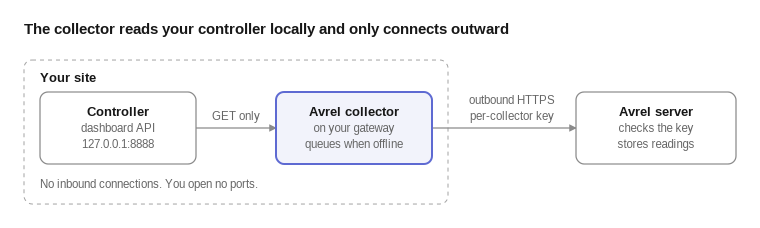
You install a small read-only collector on a computer at the site, called the gateway. It reads your controller's status and sensor pages locally and sends the readings out to your Avrel server. Readings flow one way. Nothing connects into the site, so you never open a port or give Avrel access to your network.
- Reads only. The collector never sends commands to equipment and cannot open hardware devices such as I2C, GPIO or serial ports.
- One key per collector. Each collector has its own key, which only lets it report for your organization. You can revoke it at any time.
- Keeps going offline. If the link to Avrel drops, readings queue on the gateway and upload when the link returns.
- Reports what it sees. If your controller stops answering, the collector says so, and Avrel shows the system as CONTROLLER OFFLINE rather than going quiet.
- Tells you when it goes quiet. If a collector stops reporting, Avrel alerts your channels with what it reported in its last minutes and a best guess at the cause. See Alerts and collector health.
Not available yet#
So that you can plan around them, these are the gaps you would hit today.
| Gap | What to do meanwhile |
|---|---|
| Password reset by email | Ask your Avrel contact for a one-time reset link. |
| Sign-in with your company's identity provider (SSO) | Each person uses an email and password. |
| Recording incidents | Incidents appear only once Avrel adds them for you. |
| Sending releases from your own build tools | Record each release in the app on the release gate page. |
| Voltage and current readings | These need a logger on the power system. Without one, Avrel shows No data for them rather than a guess. |
| Other controller types | Only the hydro-readonly source is supported. Other controllers need a new source type in the collector. |
| Automatic collector updates | Run the install command again to update. |
| Several systems on one gateway | A gateway runs one collector for one system. Use a gateway per system for now. |